Stay informed with the latest IT tips
Cybersecurity advice and exclusive resources from the Andisa team, straight to your inbox.
I’m sure you have all tried to link a BT business broadband without using their Hub router. If you have a set of static addresses so that your public IP address doesn’t change from day to day then it’s a little harder.
Our setup tries to make it more understandable, and the process is transferable. It doesn’t matter if you are working in a complex internal network with routed networks, or if you just have one network internally but your leased line provider is giving a set of extra IP addresses as a routed block.
When you set up your router you will have added a NAT masquerade rule so that traffic outbound is NAT’d by the router. That way the information looks like it’s coming from your public address externally rather than an unreachable internal private address.
For novices, remember that the private address ranges are only for internal use AND because they are used inside each building, the internet cannot work out where to send return traffic. As a result, they cannot exist on the internet. Instead you normally have a single public IP address given by your broadband provider. This is only in use in one place and so return traffic does know how to get back.
The private ranges are:

So to overcome it, you set your router up to NAT every internal data packet. It marks every packet with its own address, and then records which internal private address it came from into its NAT table. This is used to “unmark” the packets as they return.
If you add further public addresses inside your router, then NAT breaks because they are processed as if they are private addresses yet the whole internet knows that they should be directly accessible.

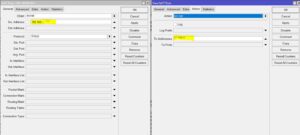
This is needed to make sure that outbound, one particular private address, IE your server or PC, is bound to a chosen public static address.