Stay informed with the latest IT tips
Cybersecurity advice and exclusive resources from the Andisa team, straight to your inbox.
Its a good idea to regularly change your password. Use a phrase and replace some letters with numbers. Also use upper and lower case – i.e. ilovemywife becomes 1l0veMyWif3
1. Log onto the server. Once you are logged on, press CTRL ALT END. The following page should appear:
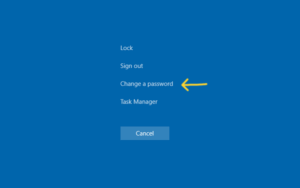
2. Click on change a password and the following should appear:
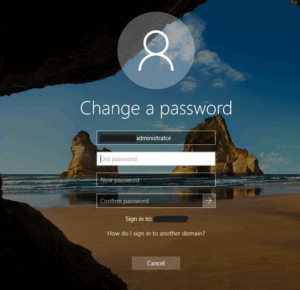
3. Enter the current password
4. Enter a new password twice
5. Press return. Your password should now be changed
If you have any issues then please speak to our Supportdesk team either by email su*********@****sa.net or call 01423290029.







