SCAM attacks

A scammer recently opened a fake Facebook account designed to look like ALDI, and offered discounted shopping to certain age groups.
If an offer looks too good then it probably is too good to be true!
Storage Full Scam

Thanks to Malwarebytes for this report / blog post. “iCloud storage is full” scam is back, and now it wants your payment details | Malwarebytes
Their product is one of the leading security products out there and really helps prevent clickbait style scams.
The threat of losing your photos is a powerful lure, so scammers are now using it to steal personal and financial details.
The Guardian warns about an iCloud-themed campaign that start with a few “your iCloud storage is full’ messages, then escalates to threats. If you don’t respond or take action, the emails claim your data will be wiped on a specific date.
US Consumer Affairs has urged users not to click any links and to contact Apple directly if they receive such messages.
The deadline in the emails is never far away, usually just two days. No scammer ever wants you to think things through before you act, so there is always time pressure.
We’ve seen these emails in English and Spanish. Oddly, the monthly rate is set at 99 pence or 99 euro cents respectively.
The 0.99 seems to be the magic number. In reality, scammers don’t care about the payment. What they want is for you fill out the form on their phishing site.
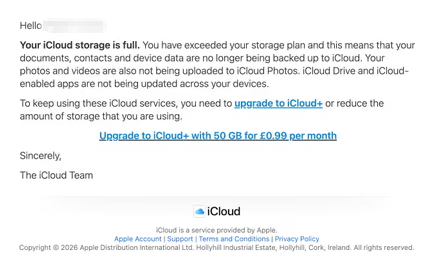
The screenshot above is just one of many examples. There are plenty of variations, but they all follow the same them: make a small payment to stop the files in your iCloud storage from being deleted.
The websites these emails link to also vary, but they all ask for personal and payment details to complete that payment.
How to stay safe
It’s worth remembering that Apple does notify users when their iCloud storage is nearing capacity, but those alerts appear within your device settings or as official system notifications. They don’t come through unsolicited text messages or emails with external links. If you need to check your storage, go directly to Settings on your device and review your iCloud usage.
So, to stay safe:
- Always access your account through our official website.
- Never share your password with anyone.
- Never click on links in unsolicited emails without verifying with a trusted source.
- Use an up-to-date, real-time anti-malware solution with a web protection component.
- Do not engage with websites that attract visitors like this.
- Call your IT provider if you are ever unsure.